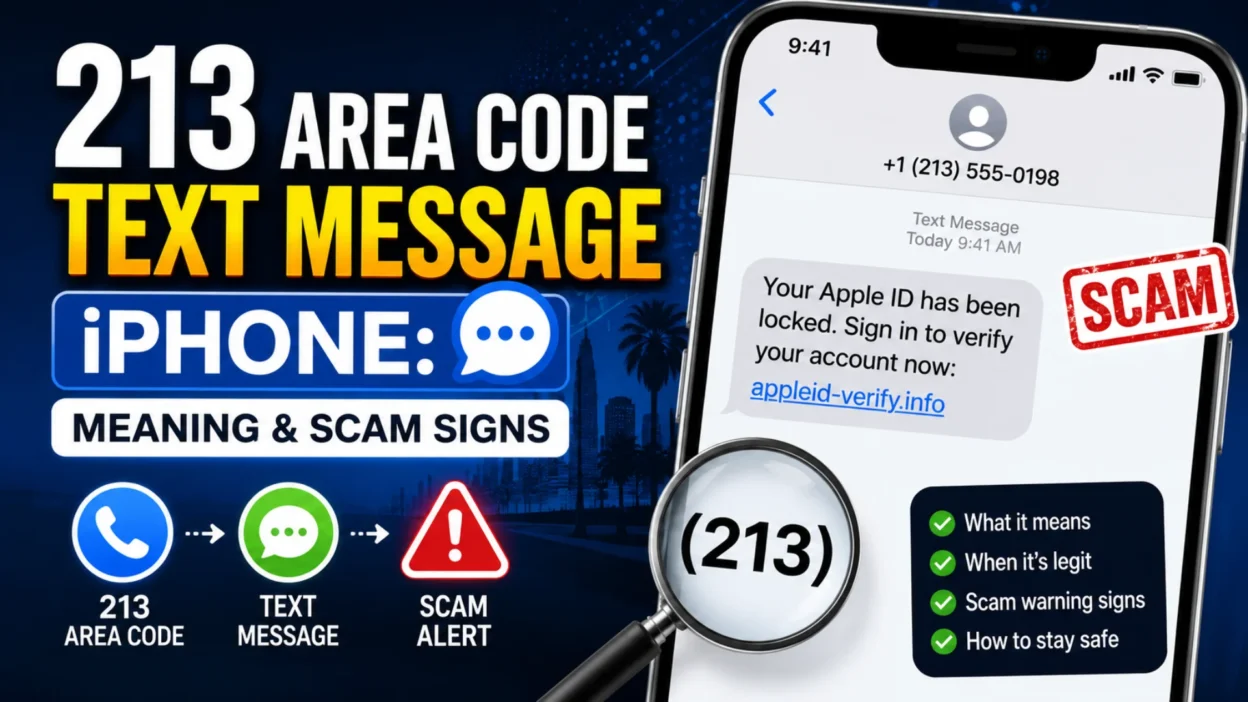
Receiving a 213 area code text message on your iPhone can leave you wondering who contacted you and whether the message is safe. The 213 area code belongs to California and is primarily associated with Los Angeles. However, the area code alone cannot confirm who sent a message or whether the sender can be trusted.
An unexpected text could come from a legitimate business, someone who entered the wrong number, or a person trying to contact you for an ordinary reason. It could also be spam or a phishing attempt designed to collect personal information.
The safest approach is to examine the message rather than judge it by the phone number. This guide explains what the 213 area code means, why you might receive an unfamiliar text, how to recognize warning signs, and how to protect your iPhone.
What Is the 213 Area Code?
The 213 area code is a geographic telephone area code in California. It was introduced in 1947 and is now primarily associated with downtown Los Angeles and nearby areas.
The surrounding Los Angeles region also uses area codes 323 and 738. These codes help provide telephone numbers across the region.
Here are the main facts about area code 213:
| Detail | Information |
|---|---|
| State | California |
| Main location | Los Angeles area |
| Introduced | 1947 |
| Related area codes | 323 and 738 |
| Time zone | Pacific Time |
| Type | Geographic telephone area code |
Receiving a text from a 213 number does not automatically mean the message is fraudulent. Legitimate people and businesses can use numbers with this area code.
However, the displayed number does not necessarily reveal the sender’s current location or true identity.
What Does a 213 Area Code Text Message Mean on iPhone?
A 213 area code text message means the phone number displayed in the conversation uses the 213 area code. It does not tell you whether the sender is a friend, a business, a stranger, or a scammer.
Consider these examples:
- “Your appointment is confirmed.” This could be a legitimate notification if you recently booked an appointment.
- “Hi, is this Alex?” This might be a wrong-number message.
- “Your account will be suspended today. Verify now.” This deserves caution, particularly if it includes an unfamiliar link.
- “You have won a cash prize.” An unexpected prize notification may be an attempt to obtain personal or financial information.
The wording, context, and requested action matter more than the first three digits of the number.
Why Am I Getting Text Messages From a 213 Number?
There are several possible reasons an unfamiliar 213 number might contact you. Understanding the possibilities can help you decide what to do next.
1. Someone Entered the Wrong Number
A person may have mistyped a phone number while contacting a friend, making a reservation, or sending a personal message. If the text appears harmless, it may simply be a mistake.
You do not need to respond if you do not recognize the sender.
2. A Business Is Contacting You
A business may use a 213 number to send appointment reminders, delivery updates, or customer service messages.
If you recently interacted with the business, the message may be legitimate. When uncertain, verify it through the business’s official app or website rather than using an unexpected link.
3. Someone Changed Their Phone Number
An acquaintance may have a new number that you have not saved in your contacts. This is another possible explanation for an unfamiliar message.
Still, do not assume that the sender is someone you know simply because the conversation sounds familiar.
4. You Received an Unwanted Promotional Text
Some messages advertise products, services, or offers you never requested. These may be unwanted marketing messages or spam.
Avoid engaging with messages that appear suspicious or provide no clear way to identify the sender.
5. A Scammer Is Trying to Contact You
Scammers can use ordinary-looking messages to start conversations. They may eventually ask for money, account information, verification codes, or access to another messaging platform.
Some scams begin with a simple greeting rather than an obvious threat.
6. The Displayed Number May Be Spoofed
Number spoofing involves manipulating the caller ID or displayed number to make communication appear to come from another number.
As a result, a text displaying a 213 area code does not prove that the sender is physically located in Los Angeles.
Is a 213 Area Code Text Message a Scam?
No, not every message from a 213 number is a scam. The area code is legitimate and is used for ordinary telephone communication.
The risk depends on the particular message and the sender’s behavior.
A text may deserve closer attention if it:
- Requests passwords or verification codes.
- Includes an unexpected login link.
- Demands immediate payment.
- Claims that an account will be closed unless you act quickly.
- Offers an unrealistic financial reward.
- Asks you to provide banking or identity information.
- Attempts to create fear or pressure.
Even a message without these warning signs may be unwanted or misleading. If you cannot verify the sender, avoid sharing sensitive information.
Warning Signs of a Suspicious 213 Text
Recognizing common scam patterns can help you avoid clicking a harmful link or revealing private information.
Unexpected Urgent Warnings
Messages claiming that your bank account, Apple Account, or another service will be suspended immediately may be designed to make you act without checking the facts.
Instead of following the message’s instructions, open the relevant service independently and check your account.
Requests for Verification Codes
A stranger may claim they sent a code by mistake or need your help recovering an account.
Never share a verification code with an unknown person. Such codes may allow someone to access an account or complete a login process.
Suspicious Links
Unexpected links can lead to imitation websites that collect passwords or financial details.
Do not open a link simply because the message mentions a recognizable company. Verify the claim through a trusted source.
Unexpected Money or Prize Offers
Messages promising easy money, lottery winnings, or guaranteed investment returns should be treated carefully, especially when they require an upfront payment or personal details.
Wrong-Number Conversations That Become Personal
Some suspicious conversations begin with a casual greeting or an apparent mistake. The sender may gradually build familiarity before introducing an investment, financial opportunity, or request for money.
A friendly tone does not establish trustworthiness.
How to Check Whether a 213 Text Is Legitimate
Before taking action, use a few simple checks.
Check the context. Were you expecting a delivery, appointment reminder, or message from someone in Los Angeles?
Look at the request. Is the sender asking you to pay, click a link, provide a code, or disclose private information?
Verify the organization independently. If the message claims to come from a bank, retailer, or technology company, open its official app or enter its known website address yourself.
Avoid relying on the phone number alone. A familiar area code is not proof of identity.
Consider whether the message makes sense. Unexpected urgency, vague threats, and unrealistic promises are reasons to be cautious.
You do not have to identify the sender to protect yourself. When a message cannot be verified, ignoring it is often the simplest option.
What to Do When You Receive a Suspicious 213 Text
If a message appears suspicious, follow these steps to reduce your risk.
Step 1: Do Not Click Any Links
Avoid opening unfamiliar links or downloading files sent by an unknown number.
If the message claims there is a problem with an account, check that account through its official app or website.
Step 2: Avoid Replying
Do not continue a conversation with a sender you cannot identify and do not trust.
Even a simple reply may encourage further messages. You are not obligated to explain why you are ignoring an unknown contact.
Step 3: Never Share Sensitive Information
Do not provide passwords, verification codes, payment details, or identity information in response to an unexpected text.
A legitimate organization should not require you to disclose a password or one-time verification code to an unknown texter.
Step 4: Report the Message
Use the reporting options available in your messaging app or through your mobile carrier.
In the United States, suspicious text messages can also be forwarded to 7726, which spells SPAM. Carrier support and reporting options may vary.
Step 5: Block the Number
If the sender repeatedly sends unwanted messages, blocking the number can help prevent further contact from that particular sender.
Step 6: Delete the Conversation
After reporting the message or saving evidence you may need, delete the conversation if you wish.
Deleting a text is optional, but removing suspicious messages can reduce the chance of opening a harmful link accidentally later.
How to Block a 213 Number on an iPhone
If a particular 213 number keeps sending unwanted messages, you can block it using the Messages app.
- Open Messages on your iPhone.
- Open the conversation with the unwanted sender.
- Tap the sender’s name, number, or profile area at the top.
- Look for the option to block the caller or contact.
- Confirm the action if your iPhone asks you to do so.
The exact menu wording may vary by iOS version.
Blocking a number can help with repeated messages from that sender, but it may not stop a spam campaign that switches between multiple numbers. Reporting unwanted messages and using available filtering features can provide additional protection.
Can an iPhone Identify Scam Text Messages Automatically?
An iPhone can provide tools for managing unknown senders and filtering unwanted messages, depending on your iOS version, settings, and available services.
However, no area code or automated warning should be treated as a complete guarantee that a message is safe or fraudulent.
To improve your protection:
- Keep your iPhone software updated.
- Review available Messages filtering settings.
- Block persistent unwanted senders.
- Report suspicious messages.
- Avoid opening unfamiliar links.
- Verify important account alerts independently.
These habits can help you manage unwanted messages without relying on the area code to determine whether a sender is trustworthy.
What If a 213 Text Claims to Be From Apple or iCloud?
A message mentioning Apple, iCloud, or your iPhone should be evaluated carefully if it arrives unexpectedly.
For example, a text might claim that your account has been locked, your storage is full, or your device requires immediate verification.
Do not assume the message is genuine simply because it uses Apple’s name or logo.
Instead, open the relevant Apple service independently and review your account. Avoid entering your credentials on a page reached through an unexpected text link.
The same principle applies to banks, delivery companies, retailers, and other organizations. Verify the claim through a trusted channel rather than following instructions from an unfamiliar sender.
Should You Reply to a Wrong-Number Text From 213?
If you do not recognize the sender, you generally do not need to reply.
A harmless wrong-number message may simply be a mistake. However, some suspicious conversations use this approach to start a relationship with an unsuspecting recipient.
Be especially cautious if the sender quickly introduces financial opportunities, requests personal details, or asks you to move the conversation to another app.
If the message is clearly connected to someone you know, you can use a contact method you already trust to verify it. Otherwise, ignoring the message is a reasonable choice.
213 Text Message vs. 213 Phone Call
A 213 text and a 213 phone call share the same basic limitation: the displayed area code does not prove who is contacting you.
| Situation | What it means |
|---|---|
| Text from a 213 number | The displayed number uses the 213 area code. |
| Call from a 213 number | The displayed caller ID uses the 213 area code. |
| Message from a known business | It may be legitimate, but unusual requests should still be verified. |
| Unexpected message from a stranger | The sender’s identity is unconfirmed. |
| Message with an urgent payment demand | Verify the claim independently before taking action. |
| Message displaying a spoofed number | The displayed number may not identify the real sender. |
The key distinction is between identifying an area code and verifying a person’s identity. These are not the same thing.
What If You Already Replied to a Suspicious 213 Text?
If you replied to an unknown number, there is no need to panic.
If you only sent a harmless response, stop communicating if the conversation seems suspicious. You can block the number if needed.
If you clicked a link, avoid entering additional information. If you entered a password, change it through the legitimate service’s official app or website.
If you shared financial information, contact your bank or payment provider through a trusted channel. If you disclosed an account verification code, review the affected account’s security settings and take immediate steps to secure it.
Your next action should depend on what information, if any, you shared.
Can You Find Out Who Owns a 213 Number?
The area code alone cannot reveal the identity of the person who sent a text.
A 213 number may belong to an individual, a business, or a telephone service. The displayed number may also have been spoofed.
A reverse phone lookup may provide information in some cases, but results can be incomplete, outdated, or inaccurate.
If the sender claims to represent a company, verify the claim using the company’s independently obtained contact information. Do not treat an online listing or matching area code as definitive proof of identity.
Common Myths About 213 Text Messages
Several misconceptions can make people either overly worried or too trusting when they receive an unfamiliar text.
| Myth | Reality |
|---|---|
| Every 213 message is a scam. | The area code is legitimate. |
| A 213 number proves the sender lives in Los Angeles. | The displayed area code does not establish the sender’s current location. |
| A local number is automatically safe. | Numbers can be spoofed, and scammers can use local-looking numbers. |
| Every wrong-number text is harmless. | Some suspicious conversations begin with an apparent mistake. |
| Blocking one number stops all spam. | Other numbers may still be used. |
| An iPhone can prevent every scam text. | Filtering tools help, but they cannot guarantee complete protection. |
| A message mentioning Apple must be genuine. | A company name can be used in an impersonation attempt. |
Understanding these distinctions helps you make sensible decisions without assuming every unknown message is dangerous.
How to Reduce Unwanted Text Messages on Your iPhone
You cannot prevent every unwanted text, but a few habits can help reduce exposure and protect your accounts.
- Review the message-filtering options available on your iPhone.
- Block numbers that repeatedly send unwanted messages.
- Report suspicious texts through available reporting channels.
- Avoid responding to obvious spam.
- Never share passwords or verification codes with unknown senders.
- Verify financial and account-related requests independently.
- Keep your device and apps updated.
- Be cautious about sharing your phone number on unfamiliar websites.
- Use strong, unique passwords for important accounts.
- Enable additional account security features when available.
These steps are useful for unwanted messages from any area code, not just 213.
Frequently Asked Questions
Is 213 a legitimate area code?
Yes. The 213 area code is a legitimate California area code primarily associated with downtown Los Angeles and nearby communities.
Why did I receive a random text from a 213 number?
Possible explanations include a wrong number, a legitimate business message, an unfamiliar contact, promotional spam, or a scam attempt. The content of the message can help you assess the situation.
Is every 213 area code text message a scam?
No. The area code itself is not fraudulent. However, scammers can use or spoof numbers displaying the 213 prefix.
Should I block an unknown 213 number?
Blocking is reasonable if the sender repeatedly contacts you with unwanted or suspicious messages. For a single unfamiliar message, you can also simply ignore it.
Can a 213 text message reveal my location?
Receiving a text does not, by itself, reveal your physical location to the sender. However, interacting with suspicious links or sharing personal information can create additional privacy risks.
What if a 213 text asks for my verification code?
Do not share the code. If you already shared it, secure the affected account immediately through its official service.
Can I report a suspicious 213 text?
Yes. You can use the reporting features available in your messaging service or carrier. In the United States, 7726 is a commonly used short code for reporting spam texts.
What should I do if I clicked a suspicious link?
Do not enter further information. If you provided a password or financial details, secure the affected account and contact the relevant provider through a trusted channel.
Final Thoughts
A 213 area code text message on your iPhone is not automatically a scam. The number belongs to a legitimate California area code, but that fact alone does not establish who sent the message or whether its contents are trustworthy.
Pay attention to suspicious links, urgent demands, requests for verification codes, and unexpected financial offers. If you cannot verify the sender, avoid replying or sharing personal information.
The simplest rule is to judge the message by its content and behavior rather than its area code. Verify important claims independently, report suspicious texts when appropriate, and use your iPhone’s available blocking and filtering features to manage unwanted contact.

Serhii Dunev is a passionate content creator dedicated to crafting meaningful texts, messages, and word inspirations. He aims to help people express their emotions clearly through simple and impactful words.