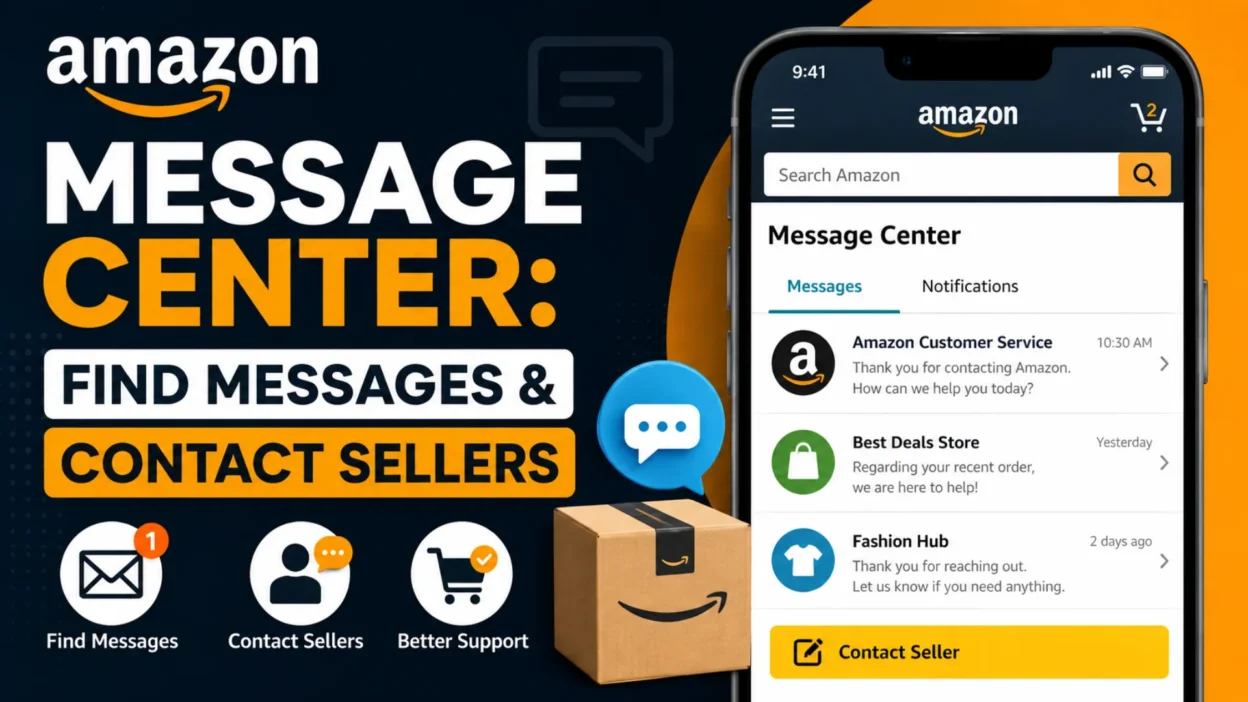
The Amazon Message Center is Amazon’s built-in place for viewing communications between customers, sellers, and Amazon. If you’re trying to find a seller’s reply, check an order conversation, or manage buyer messages as a seller, this is the area you need.
Amazon’s layout can vary by country, device, and account type. That’s why the message section may not appear exactly where you expect. For buyers, Amazon provides access through Your Messages and the Buyer/Seller Messages area. Sellers use the Buyer-Seller Messaging service inside Seller Central.
This guide explains where to find your messages, how buyer-seller communication works, what to do when messages are missing, and how the system differs for buyers and sellers.
What Is the Amazon Message Center?
The Amazon Message Center is a centralized area for Amazon-related communication. It can contain conversations connected to purchases, marketplace sellers, and customer-service interactions.
For shoppers, the Message Center is particularly useful when you’ve contacted a third-party seller or received a response about an order. Amazon’s Buyer-Seller Messaging Service allows customers to view previous conversations and reply to sellers.
For sellers, the system is part of Seller Central. It helps organize buyer questions and order-related communication in one place.
The exact options can differ depending on whether you’re using Amazon as a buyer or seller. Therefore, the steps below separate the two experiences.
How to Find the Amazon Message Center as a Buyer
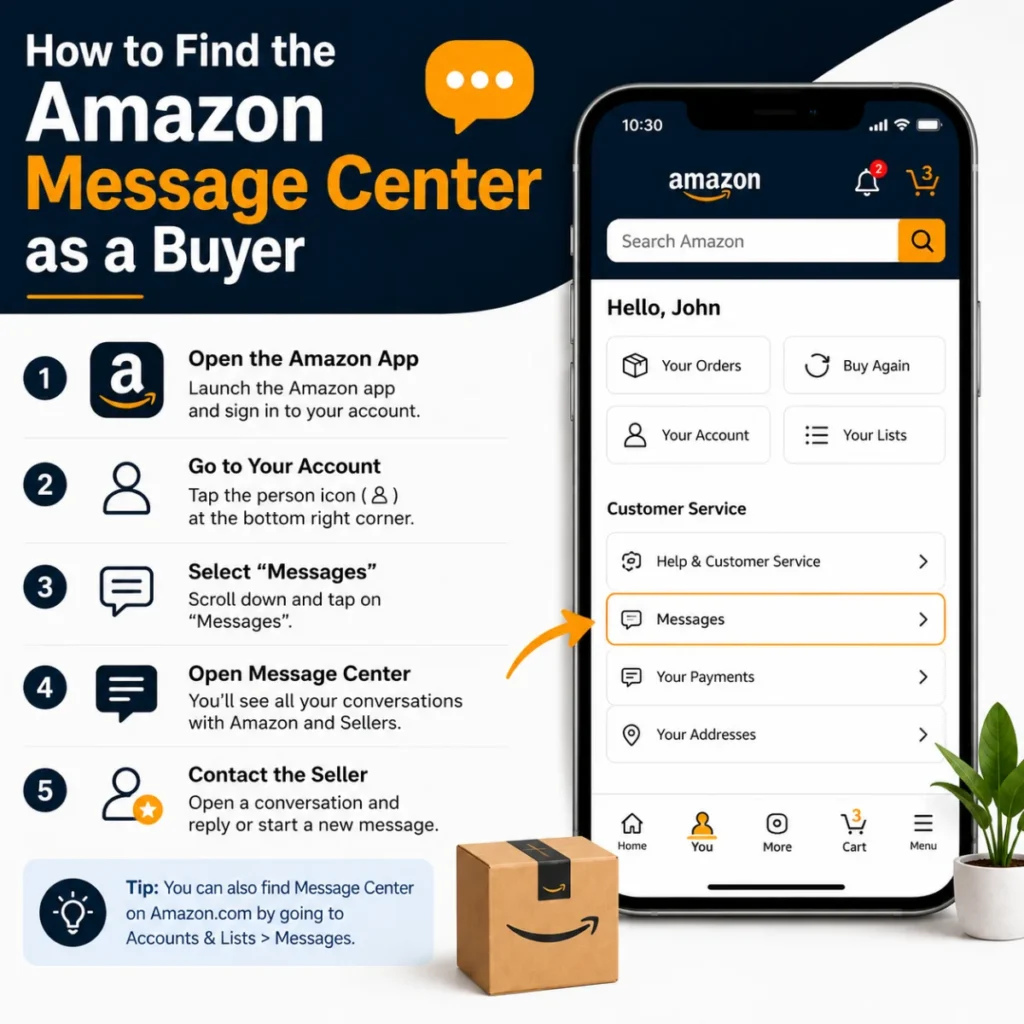
If you’re shopping on Amazon and want to check messages from a marketplace seller, start with your Amazon account.
On Amazon’s website, look for Your Account and then Your Messages. Amazon’s own customer guidance also points buyers toward the Message Center and the Buyer/Seller Messages tab for seller communication.
You can typically follow this path:
- Sign in to your Amazon account.
- Open Account & Lists.
- Go to Your Account.
- Find Your Messages or the Message Center.
- Select Buyer/Seller Messages when available.
- Open the conversation you want to review.
Amazon’s interface may change over time, so the wording or location of these options can differ slightly.
What You’ll Find There
Depending on your account and activity, you may see:
- Messages from marketplace sellers
- Replies to questions about products
- Order-related communication
- Previous buyer-seller conversations
- Sent messages
- Other Amazon account communications
If you contacted a seller through an order, you can also start from Your Orders. Amazon recommends selecting the relevant order and choosing the appropriate support or seller-contact option.
How to Check Amazon Messages on a Phone
Checking messages on a phone can be less obvious because the Amazon Shopping app uses a different navigation layout from the desktop website.
Start by opening the Amazon app and signing into the correct account. Then open the account or menu area and look for Your Account or Message Center.
Amazon’s customer forum guidance describes a mobile route through the menu, then the Account area, followed by Your Messages and Buyer/Seller Messages.
If you’re dealing with a specific purchase, there’s another useful option. Open Your Orders, select the relevant order, and look for a contact or support option.
This can be easier than searching through your entire inbox when you already know which order the conversation concerns.
How to Contact an Amazon Seller
You don’t necessarily need to open the Message Center before contacting a marketplace seller.
If you’ve already purchased an item, Amazon says you can go to Your Orders, choose the marketplace item, and select an appropriate option such as Problem with order, Get product support, Return items, or Ask Product Question, depending on the order.
If you haven’t purchased the item yet, Amazon provides a seller-contact route from the product listing. You can select the seller’s name and use Ask a question when that option is available.
This distinction matters because contacting a seller about a particular order is often faster than searching for an old conversation manually.
Amazon Message Center for Sellers
Sellers use a different side of Amazon’s messaging system.
In Seller Central, Amazon’s Buyer-Seller Messaging tool lets sellers locate buyer conversations, review the issue, write a response, and send it through Amazon. Amazon’s seller guidance describes opening Seller Central, locating the conversation through the messaging area, and replying with relevant information.
A seller might use this system for situations such as:
- Resolving an order problem
- Answering product questions
- Providing necessary troubleshooting information
- Clarifying order details
- Addressing delivery-related concerns
- Handling return-related questions
The purpose isn’t simply to create another inbox. It’s designed to keep important buyer-seller communication connected to Amazon transactions.
Why You Might Not See a Message
Sometimes people expect to see a message immediately but can’t find it. Several explanations are possible.
You’re Using the Wrong Amazon Account
If you have multiple Amazon accounts, first confirm that you’re signed into the account used for the purchase.
You’re Looking in the Wrong Section
A seller conversation may appear under Your Messages rather than your regular email inbox. Similarly, a seller should look in Seller Central rather than the buyer-facing account area.
The Conversation Is Connected to an Order
Starting from Your Orders can be easier when you’re trying to locate a specific conversation.
Amazon’s Interface Has Changed
Amazon periodically changes navigation. A guide showing an older menu path may not exactly match the current interface.
You Haven’t Received a Reply Yet
If you contacted a marketplace seller, the response may take some time. Amazon’s UK customer guidance currently says sellers should respond within 48 hours.
Therefore, don’t assume a missing response means your original message failed.
What Is Buyer-Seller Messaging?
Buyer-Seller Messaging is the communication system Amazon provides for interaction between customers and third-party sellers.
The service is designed to keep communication inside Amazon rather than requiring customers and sellers to exchange personal contact details. Amazon says buyers can view previous conversations and reply through the service.
For sellers, the system provides a structured way to handle customer questions and order-related issues.
This is especially useful when a buyer needs help with an order but doesn’t want to search for the seller’s independent website or contact information.
What Can Sellers Message Buyers About?
Amazon places restrictions on seller communication. Sellers should use messaging for legitimate order or customer-service purposes rather than treating the inbox as a general marketing channel.
Amazon’s seller guidance lists examples such as resolving fulfillment issues, requesting information needed to complete an order, handling return questions, providing invoices, and addressing necessary product or delivery matters.
Amazon’s communication guidelines also restrict certain promotional and review-related content. For example, sellers shouldn’t use messages to manipulate reviews or offer compensation in exchange for positive feedback.
In other words, the Message Center isn’t simply an email marketing tool.
Can You Reply to Amazon Messages?
Yes. Buyers can reply to seller messages through the Buyer-Seller Messaging Service when the conversation supports a response. Amazon specifically lists viewing previous communication and replying to seller messages as features of the service.
For sellers, replies can be sent from Seller Central through the Buyer-Seller Messaging tool. Amazon’s seller instructions recommend locating the conversation, entering the response, and sending it from the messaging interface.
When replying, keep the message focused on the actual issue. Include order details when necessary, explain what you need clearly, and avoid unnecessary personal information.
Amazon Message Center vs. Amazon Customer Service Chat
These two features can seem similar, but they’re not the same.
Message Center generally relates to stored communications, particularly buyer-seller conversations.
Amazon Customer Service chat is a separate support channel used when you need help directly from Amazon.
For example, if you need to ask a marketplace seller about a product-specific issue, buyer-seller messaging may be appropriate. If you need Amazon to investigate an account, payment, or platform issue, you may need Amazon Customer Service instead.
Choosing the right channel can save time because your request reaches the party responsible for handling it.
How to Find an Old Amazon Message
Looking for an older conversation? Start by checking the Message Center under the same Amazon account that made the purchase.
Then search through your buyer-seller conversations if the interface provides filtering or sorting options.
If you remember the order, use Your Orders to locate it first. Amazon’s current customer guidance recommends starting from an order when contacting a marketplace seller about an existing purchase.
For sellers, Amazon’s messaging tools can provide filters and search functions for finding buyer conversations. Amazon’s Seller app documentation also describes searching keywords and filtering for messages that still require a response.
What to Do If an Amazon Seller Doesn’t Reply
If you’ve contacted a marketplace seller and haven’t received an answer, first check the Message Center again and confirm you’re using the correct account.
Next, review the order page. Amazon may provide additional options based on the order status and the nature of your problem.
For some marketplace orders, Amazon explains that if a seller doesn’t respond within the applicable timeframe, buyers may have additional support or A-to-z Guarantee options depending on the situation.
Don’t send repeated messages immediately. Give the seller reasonable time to respond, then use Amazon’s available support options if the issue remains unresolved.
Tips for Using Amazon Messages Safely
Although Amazon provides a protected communication system, you should still pay attention to suspicious requests.
Be cautious if a message:
- Asks for sensitive account information
- Requests payment outside Amazon
- Directs you to an unfamiliar website
- Creates unnecessary urgency
- Requests information unrelated to your order
- Contains suspicious attachments or links
Amazon’s messaging system includes filtering for spam and phishing attempts, and Amazon notes that inappropriate content can be removed.
If something feels unusual, don’t rush to respond. Check the order directly through Amazon rather than relying solely on a message’s links.
Common Amazon Message Center Mistakes
A few simple mistakes can make finding or managing messages harder than necessary.
Using the wrong account:
Always confirm you’re signed into the account associated with the order.
Checking only your email:
Some communications are easier to locate inside Amazon’s Message Center.
Ignoring the order page:
Your Orders can provide a direct route to the seller or support option you need.
Confusing sellers with Amazon:
A third-party seller and Amazon Customer Service are different parties.
Sharing unnecessary personal information:
Keep communication focused on the order and avoid sensitive details.
Trusting every message automatically:
Check unusual requests against the actual order in your Amazon account.
Frequently Asked Questions
Where is the Amazon Message Center?
For buyers, the Message Center is generally available through your Amazon account under Your Messages. Seller conversations can be found under the Buyer/Seller Messages area.
How do I check my Amazon seller messages?
If you’re a seller, sign in to Seller Central and open the Buyer-Seller Messaging area. Amazon’s seller instructions describe using the messaging interface to locate conversations and respond to buyers.
Can I contact an Amazon seller before buying?
Often, yes. Amazon says buyers can select a seller from a product listing and use Ask a question when that option is available.
Why can’t I find my Amazon seller messages?
Check that you’re using the correct account, then look under Your Messages or Buyer/Seller Messages. If the conversation concerns an order, checking Your Orders can also help locate the relevant contact option.
Is Amazon Message Center the same as customer service chat?
No. Buyer-seller messaging is designed for communication with marketplace sellers, while Amazon Customer Service is a separate support channel.
Can Amazon sellers send promotional messages?
Amazon restricts seller communication and prohibits certain marketing, promotional, and review-manipulation content. Sellers should follow Amazon’s current communication rules when contacting buyers.
How long does an Amazon seller have to respond?
The timeframe can vary by Amazon marketplace and applicable policy. For example, Amazon’s UK customer guidance currently says sellers should respond within 48 hours.
Is Amazon Message Center safe?
Amazon provides the messaging service to keep buyer-seller communication within its platform and protect customer information. However, you should still treat unexpected requests, links, and payment demands cautiously.
Final Thoughts
The Amazon Message Center is useful when you need to find a seller response, review an old conversation, or manage communication connected to an Amazon order.
For buyers, the easiest approach is usually to start with Your Messages or Your Orders. For sellers, the Buyer-Seller Messaging area in Seller Central is the main place to manage customer conversations.
If you can’t find a message, don’t assume it disappeared. Check the correct account, look at the related order, and make sure you’re using the buyer or seller interface appropriate to your situation.

Serhii Dunev is a passionate content creator dedicated to crafting meaningful texts, messages, and word inspirations. He aims to help people express their emotions clearly through simple and impactful words.