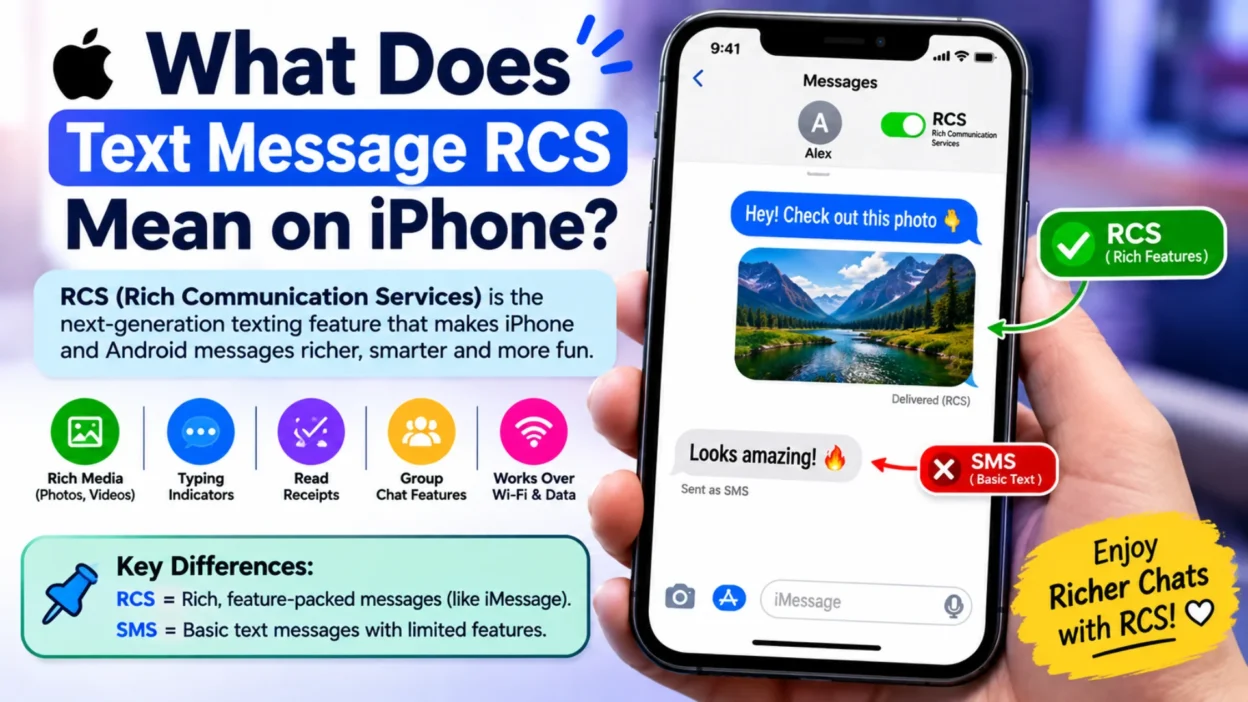
If you’ve noticed “RCS” in your iPhone’s messaging settings or beside a text conversation, you may be wondering what it means. RCS stands for Rich Communication Services. It’s a newer messaging standard that provides features beyond traditional SMS and MMS.
On iPhone, RCS can make texting with people who use compatible Android phones feel more like modern messaging. Depending on your carrier, device settings, and software version, RCS may support features such as higher-quality photos and videos, delivery indicators, read receipts, typing indicators, and improved group messaging.
What Does RCS Mean in Text Messages?
RCS means Rich Communication Services.
It is a messaging standard designed to improve traditional SMS and MMS. Instead of relying only on older text-message features, RCS can provide a richer messaging experience when supported by the sender’s and recipient’s devices and networks.
In simple terms:
SMS = basic texting
MMS = texting with certain media
RCS = more advanced messaging features
RCS doesn’t replace every type of message on your iPhone. Instead, it works as another messaging method when the necessary requirements are met.
What Is RCS on iPhone?
RCS on iPhone allows compatible messages with Android users to use features that weren’t traditionally available through SMS or MMS.
For example, an RCS conversation may support:
- Read receipts
- Typing indicators
- Delivery notifications
- Higher-resolution photos
- Better-quality videos
- Improved group conversations
- Larger message capabilities
However, the exact features can vary.
Your mobile carrier must support RCS, and the recipient’s device and network also need to support the appropriate RCS functionality.
Why Does My iPhone Say RCS Instead of SMS?
You may see RCS because your iPhone is using the RCS messaging standard for that conversation instead of traditional SMS or MMS.
This can happen when you’re messaging someone who uses a compatible Android device and the required carrier and network support is available.
Therefore, seeing RCS doesn’t mean there’s something wrong with your iPhone.
It simply indicates that the conversation is using a different messaging technology.
RCS vs. SMS on iPhone
The biggest difference is the range of features available.
| Feature | SMS | RCS |
|---|---|---|
| Basic text messages | Yes | Yes |
| Delivery indicators | Limited | Supported |
| Read receipts | Limited | Supported |
| Typing indicators | No | Supported |
| Higher-quality media | Limited | Supported |
| Group messaging | Basic | Improved |
| Works through cellular service | Yes | Usually requires supported connectivity |
RCS is therefore designed to provide a more modern texting experience.
Still, availability depends on the network and devices involved.
Does RCS Mean the Person Has Android?
Not necessarily in every situation, but on iPhone, RCS is commonly relevant when you’re communicating with someone using a compatible Android device.
If you’re messaging another iPhone user through Apple’s supported messaging system, the conversation can use Apple’s messaging features instead.
As a result, RCS is particularly important for communication between iPhones and compatible Android phones.
Does RCS Work Without Wi-Fi?
RCS can use mobile data instead of requiring Wi-Fi.
However, your carrier and network need to support RCS, and the phone needs an appropriate data connection.
So, losing Wi-Fi doesn’t automatically mean RCS will stop working.
If mobile data is unavailable, message behavior can depend on your settings, network, and the type of message you’re sending.
Does RCS Cost Money on iPhone?
RCS itself isn’t normally charged as an individual text message in the same way that traditional SMS charges may apply under certain mobile plans.
However, RCS can use mobile data.
Your carrier’s plan and policies determine how data usage is handled.
If you’re concerned about charges, check your mobile plan rather than assuming that every RCS message is completely separate from your data allowance.
How to Turn On RCS Messaging on iPhone
If your carrier and iPhone support RCS, you can check the relevant setting through your Messages settings.
Generally:
- Open Settings.
- Tap Apps.
- Select Messages.
- Look for the RCS Messaging option.
- Turn it on if it’s available.
The exact menu can vary depending on your iOS version.
If you don’t see an RCS option, that doesn’t necessarily mean your iPhone is faulty. Your carrier, region, or software version may not currently support the feature.
Why Is RCS Messaging Not Showing on My iPhone?
Several reasons can explain why you don’t see RCS.
Your Carrier Doesn’t Support It
RCS availability depends partly on carrier support.
If your carrier hasn’t enabled the necessary service, the option may not appear.
Your iPhone Software Is Outdated
Some messaging features require a supported iOS version.
Check for available software updates if you believe your iPhone should support RCS.
Your Region May Matter
RCS availability can differ between countries and carriers.
Consequently, an option available to one iPhone user may not appear for another user.
Your Network Settings May Need Attention
Connectivity or carrier-related settings can sometimes affect messaging features.
If RCS isn’t working despite being available, checking your cellular connection can be useful.
What Does RCS Mean in a Group Text?
In a group conversation, RCS can provide a richer experience than traditional group SMS or MMS.
Depending on the supported features, participants may benefit from better media sharing, typing indicators, delivery information, and read receipts.
However, group messaging can become more complicated when participants use different devices, carriers, or messaging standards.
Therefore, the available features may not be identical for every group.
Can iPhone RCS Send High-Quality Photos?
Yes, RCS is designed to provide better media sharing than traditional MMS.
This can be particularly noticeable when sending photos or videos to compatible Android users.
Instead of relying on the limitations associated with older MMS messaging, RCS can support higher-quality media.
The actual quality can still depend on network conditions, device compatibility, and the messaging service being used.
Does RCS Have Read Receipts?
RCS can support read receipts.
When the feature is available and enabled, you may be able to see whether a compatible recipient has read your message.
Likewise, the other person may be able to see when you’ve read theirs.
However, read receipts aren’t guaranteed in every RCS conversation. Settings, device compatibility, and network support can affect availability.
Does RCS Show When Someone Is Typing?
Yes, typing indicators are one of the features associated with RCS.
When supported, you may see an indicator while the other person is composing a message.
This makes RCS conversations feel more interactive.
Still, the feature depends on the messaging setup being used by both sides.
Is RCS Better Than SMS?
For many conversations, RCS provides more features than traditional SMS.
It’s particularly useful when you exchange photos, videos, group messages, or frequent replies with Android users.
However, SMS still has an important advantage: broad compatibility.
Almost every mobile phone can receive SMS messages.
Therefore, RCS is more feature-rich, while SMS remains a basic and widely compatible fallback.
Is RCS the Same as iMessage?
No.
RCS and iMessage are different messaging systems.
iMessage is Apple’s messaging service.
RCS is an industry messaging standard designed to provide richer communication features across compatible networks and devices.
This distinction matters because the features you see in a conversation can depend on which messaging system is being used.
In simple terms:
- iMessage: Apple’s messaging system
- RCS: Rich Communication Services
- SMS: Traditional text messaging
- MMS: Traditional multimedia messaging
Why Are My Messages Green When Using RCS?
On iPhone, message color can help distinguish different messaging systems.
Messages sent through Apple’s iMessage system traditionally appear in blue bubbles.
Messages sent through other systems can appear in green bubbles.
RCS messages can therefore appear in a green conversation.
However, a green bubble doesn’t automatically mean the message is a basic SMS. Depending on the conversation, it may be using RCS.
Can You Use RCS With Android Users?
Yes. That’s one of the main reasons RCS matters on iPhone.
RCS is designed to improve communication between compatible devices and networks.
When you’re texting an Android user whose device and carrier support the necessary RCS features, your conversation may use RCS rather than traditional SMS or MMS.
This can provide a more modern experience than basic texting.
Is RCS Secure on iPhone?
RCS can provide modern messaging features, but you shouldn’t assume that every RCS conversation has the same security characteristics as iMessage.
The security and privacy characteristics depend on the RCS implementation, carrier, and messaging environment.
For highly sensitive conversations, understand which messaging service you’re actually using.
Don’t assume that the presence of RCS automatically means every privacy feature associated with iMessage is available.
What Happens if RCS Isn’t Available?
If RCS isn’t available for a particular conversation, the message may use another supported messaging method.
The exact behavior can depend on your settings and network.
For example, a message may fall back to SMS or MMS when the necessary RCS service isn’t available.
This helps maintain basic communication even when richer messaging features aren’t supported.
Why Did My RCS Message Change to SMS?
This can happen for several reasons.
Your mobile data connection may be unavailable. The recipient’s device may also be offline or unable to use RCS at that moment.
Carrier support can also affect the messaging method.
In some situations, your iPhone may use another available messaging method to deliver the message.
Therefore, a change from RCS to SMS doesn’t automatically indicate a problem with your phone.
RCS Messaging Not Working on iPhone: What to Check
If RCS isn’t working, start with the basics.
Check Your Internet Connection
Make sure your iPhone has a working cellular data or Wi-Fi connection as required by the messaging service.
Check RCS Settings
Open your Messages settings and confirm that RCS is enabled if the option is available.
Check for Software Updates
An outdated iOS version may prevent access to newer messaging features.
Check Carrier Support
Your carrier needs to support RCS for the feature to work.
Restart Your iPhone
A simple restart can sometimes resolve temporary network or messaging issues.
Check the Recipient
RCS features depend partly on the recipient’s device, carrier, and network.
If they don’t support the necessary RCS features, the conversation may use another messaging method.
Does RCS Work Internationally?
RCS availability can vary by country and carrier.
If you’re traveling or messaging someone in another country, the available features may change.
Carrier support remains an important factor.
Therefore, don’t assume that RCS will work identically everywhere.
Should I Turn RCS On or Off?
For most people, keeping RCS enabled can provide access to richer messaging features when they’re available.
It can be especially useful if you frequently communicate with Android users.
However, your preference may depend on your carrier, privacy expectations, messaging habits, and how reliably RCS works on your network.
If you don’t need the additional features, you may prefer a simpler messaging setup.
Common RCS Problems on iPhone
A few issues can appear when using RCS.
Messages Aren’t Delivered
Check your connection and confirm that the recipient can receive RCS messages.
Read Receipts Don’t Appear
The feature may be disabled or unsupported on the other person’s device or network.
Typing Indicators Are Missing
Typing indicators depend on compatible RCS support.
Photos Look Different
Media quality can vary based on network conditions and device compatibility.
RCS Works With One Person but Not Another
This can happen because different recipients use different carriers, devices, or messaging configurations.
RCS vs. iMessage vs. SMS: Quick Comparison
| Feature | iMessage | RCS | SMS |
|---|---|---|---|
| Apple messaging service | Yes | No | No |
| Works with compatible Android users | Not as iMessage | Yes | Yes |
| Read receipts | Yes | Supported | Limited |
| Typing indicators | Yes | Supported | No |
| High-quality media | Yes | Supported | Limited |
| Requires carrier RCS support | No | Yes | No |
| Works on many basic phones | No | Limited | Yes |
The best option depends on the devices and networks involved.
When Should You Use RCS?
RCS is useful when you’re communicating with compatible Android users and want more than basic SMS features.
It can be helpful for:
- Sharing photos
- Sending videos
- Group conversations
- Seeing typing indicators
- Using read receipts
- Sending longer messages
- Having richer conversations
For simple one-line texts, you may not notice much difference.
Frequently Asked Questions
What does RCS mean on an iPhone?
RCS stands for Rich Communication Services. It is a messaging standard that adds features such as typing indicators, read receipts, and improved media sharing when supported.
Is RCS the same as iMessage?
No. iMessage is Apple’s messaging service, while RCS is a separate messaging standard designed to work across compatible networks and devices.
Does RCS mean I’m texting an Android phone?
Often, yes. On iPhone, RCS is particularly relevant when messaging compatible Android users. However, the exact messaging method depends on the devices and networks involved.
Are RCS messages green on iPhone?
RCS conversations can appear as green messages on iPhone because they don’t use iMessage’s blue-bubble system.
Does RCS use Wi-Fi?
RCS can use mobile data or Wi-Fi depending on the network and messaging setup. Carrier support is also required.
Is RCS better than SMS?
RCS offers more features than traditional SMS, including richer media and interactive messaging features. However, SMS remains more broadly compatible.
Why isn’t RCS working on my iPhone?
Check your iOS version, RCS settings, internet connection, carrier support, and the recipient’s device compatibility.
Can I turn RCS off on iPhone?
If RCS is available on your device, you can check the Messages settings for the RCS option and adjust it according to your preference.
Does RCS have read receipts?
RCS supports read receipts when the feature is available and enabled for the conversation.
Does RCS show typing indicators?
Yes. Typing indicators are one of the features supported by RCS, although availability depends on the messaging setup.
Conclusion
RCS brings richer messaging features to compatible conversations on iPhone, especially when communicating with Android users. It can provide better media sharing, read receipts, typing indicators, and improved group messaging compared with traditional SMS.
Still, RCS and iMessage are different technologies. Your experience can also depend on your carrier, region, iOS version, and the recipient’s device.
So, if you notice RCS in your iPhone’s Messages settings, it simply refers to Rich Communication Services—a more feature-rich option for supported text conversations.

Serhii Dunev is a passionate content creator dedicated to crafting meaningful texts, messages, and word inspirations. He aims to help people express their emotions clearly through simple and impactful words.